promise是什么
是一个表示异步操作最终完成状态的对象
- pending 进行中
- fulfilled 已成功
- rejected 已失败
创建promise
可以通过new Promise 构造函数创建一个promise对象
const myPromise = new Promise((resolve,reject)=>{
  // 异步操作
  setTimeout(() => {
    const success = true; // 假设这是异步操作的结果
    if (success) {
      resolve("操作成功"); // 将 Promise 状态改为 Fulfilled
    } else {
      reject("操作失败"); // 将 Promise 状态改为 Rejected
    }
  }, 1000);
})
promise的使用-then是微任务
//使用.then和.catch方法来处理promise的成功和失败
myPromise
  .then((result) => {
    console.log(result); // "操作成功"
  })
  .catch((error) => {
    console.error(error); // 如果失败,会打印错误信息
  });
promise.resolve
Promise.resolve是一个静态方法 用于将一个值或者一个已经存在的Promise对象转换为一个Promise对象
Promise.resolve 接受一个参数,参数可以是以下几种类型:
- 值:如果传入的是一个普通值(如字符串、数字、对象等),
Promise.resolve会返回一个状态为Fulfilled的 Promise,其值为传入的值。 - Promise:如果传入的是一个已经存在的 Promise,
Promise.resolve会返回一个新的 Promise,其状态和值与传入的 Promise 相同。
核心机制
- async 函数遇到
await X时:X会被转成一个 Promise(如果本身不是 Promise,会用Promise.resolve(X)包装)- async 函数立即 暂停执行,把剩余的代码切片封装起来等待 Promise resolve
- Promise resolve 的时机:
- 只有当
X对应的 Promise 状态变为 resolved 时,await 后的剩余代码才会被封装成微任务,排到微任务队列末尾 - 即使 Promise 已经是 resolved,async 函数也不会立即执行剩余代码,而是把它排入微任务队列末尾
- 只有当
- 事件循环顺序:
- async 函数暂停 → 主线程继续执行后续同步代码
- 微任务队列按照 FIFO 顺序执行,直到队列清空,才轮到宏任务
/**
 * 也就是说 当async函数中遇到await后 暂时将后面的n行代码存储起来
 * await后面的代码(不管是不是promise都封装成promise)只有状态变为resolve的时候
 * 才会将存储的那些n行代码封装成微任务放到队列末尾
 *
 * 比如await 1 相当于await Promise.resolve(1)
 *  也就是一个立即成功的promise 直接将后面的代码放到微任务队列
 *  然后执行async函数外层的主线程的代码
 *
 * 比如await Promise.resolve().then(()=>{})
 *  也是一个成功的promise 然后先将then放入微任务队列末尾
 *  then执行完成后 才会将存储的代码放到微任务队列末尾
 *
 * 比如await new Promise((res,rej)=>{
 *  console.log('a')
 * })
 * 就直接往下执行 如果执行器函数中有微任务 就放到微任务队列末尾
 * 有宏就放到宏任务队尾
 * 直到res()
 * 则将后续存储的代码封装为微任务然后放到队尾
 *
 * 如果await后是另外一个async函数 就先去执行这个函数里的同步代码
 * 只要 async 函数的同步代码执行完,它就立刻返回一个 fulfilled 的 Promise(值是 undefined 或 return 的值)。

⚠️ 无论 async 函数内部有没有异步操作,都不影响它立即返回。
 */
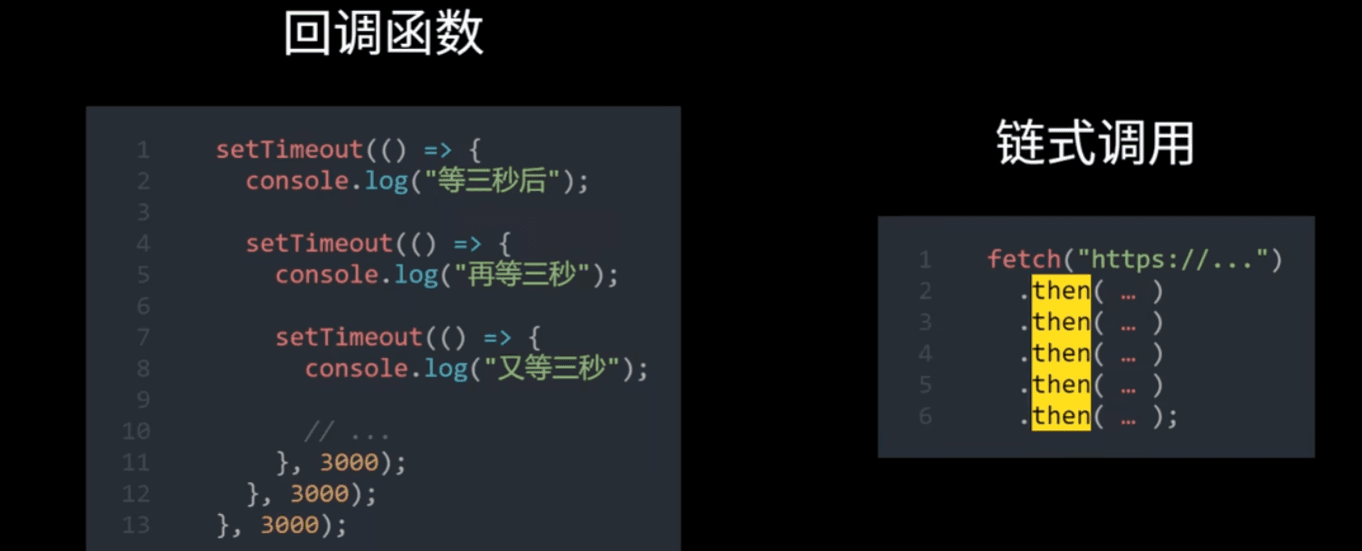
解决的问题-回调地狱
错误处理
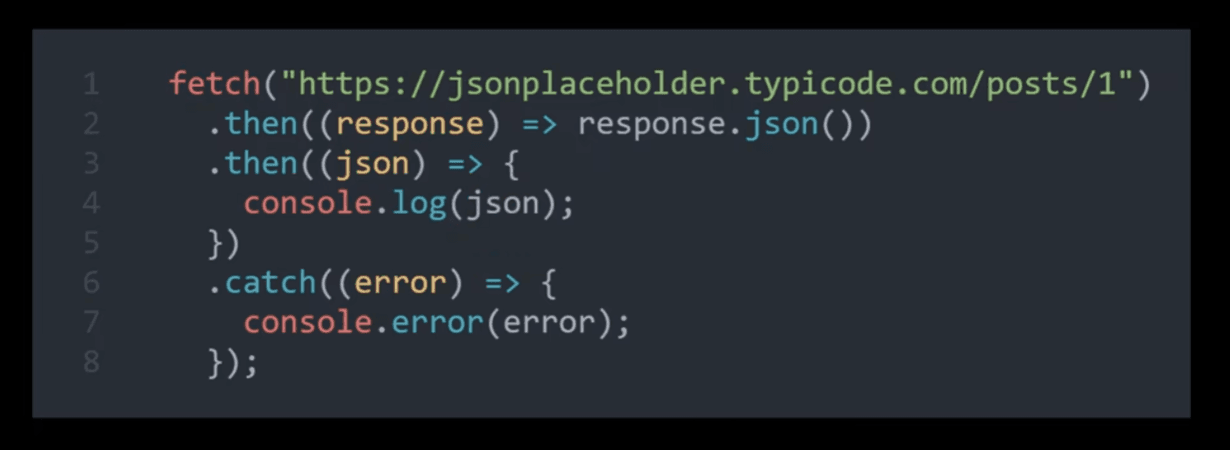
如果之中的某个过程发生了错误 可以用catch捕获 并且错误之后的then不会执行了
语法糖
async function fn(){
	await fetch('http://...')
}

//async 开头的函数意思是将函数标记为异步函数-指返回值为Promise对象的函数
//在异步函数中可以调用其他的异步函数
//不再需要then 而是更简洁的await

async function fn(){
    //await会等待promise完成之后返回最终的结果 也就是promise的结果
    //await底层是基于promise和事件循环机制实现的
    //await 永远是异步的。永远让出当前 async 函数的执行权,把后续代码加入微任务队列。
    const res = await fetch('http://...')
}

async function fn(){
    //如果有多个异步任务 则会一个一个完成
   const pa = await fetch()
   const pb = await fetch()
}

async function fn(){
   const pa = fetch()
   const pb = fetch()

   //也可以用promise.all来使得他们并行
   const [a,b] = await Promise.all([pa,pb])

}
for循环与 forEach在异步操作中的行为差异
1. for 循环与 await
- 作用域:
for循环与外部代码(如console.log("done"))在同一个作用域内。 - 暂停机制:在
for循环中使用await时,await会暂停整个async函数的执行,直到等待的Promise被解析。 - 执行顺序:
for循环逐个处理数组中的每个元素。- 每次迭代中,
await暂停当前迭代,等待异步操作完成。 - 所有异步操作完成后再继续执行外部代码。
示例代码
async function fn() {
    for (const i of [1, 2, 3]) {
        await new Promise((resolve) => {
            setTimeout(() => {
                console.log(`Promise ${i} resolved`);
                resolve();
            }, 4000);
        });
    }
    console.log("done");
}
fn();
输出结果
Promise 1 resolved
Promise 2 resolved
Promise 3 resolved
done
2. forEach 与 await
- 作用域:
forEach的回调函数是一个独立的作用域,与外部代码(如console.log("done"))不在同一个作用域内。 - 暂停机制:在
forEach的回调函数中使用await时,await只会暂停回调函数的执行,而不会暂停外部的async函数。 - 执行顺序:
forEach立即遍历数组中的每个元素,并为每个元素调用回调函数。- 每个回调函数中的
await暂停回调函数的执行,但不会暂停外部的fn函数。 fn函数会立即继续执行,不会等待forEach的回调函数完成。
示例代码
async function fn() {
    [1, 2, 3].forEach(async (i) => {
        await new Promise((resolve) => {
            setTimeout(() => {
                console.log(`Promise ${i} resolved`);
                resolve();
            }, 4000);
        });
    });
    console.log("done");
}
fn();
输出结果
done
Promise 1 resolved
Promise 2 resolved
Promise 3 resolved
3. 总结
for循环:- 与外部代码在同一个作用域。
await会暂停整个async函数的执行,直到所有异步操作完成。
forEach:- 回调函数是独立的作用域。
await只会暂停回调函数的执行,不会暂停外部的async函数。- 外部代码会立即执行,不会等待异步操作完成。
4. 解决方法
如果你希望等待所有异步操作完成后再继续执行,可以使用以下方法:
Promise.all:将所有异步操作的Promise收集到一个数组中,使用Promise.all等待所有Promise完成。for...of循环:逐个处理数组中的每个元素,使用await等待每个异步操作完成。
使用 Promise.all 的示例
async function fn() {
    const promises = [1, 2, 3].map((i) => {
        return new Promise((resolve) => {
            setTimeout(() => {
                console.log(`Promise ${i} resolved`);
                resolve();
            }, 4000);
        });
    });

    await Promise.all(promises);
    console.log("done");
}
fn();
使用 for...of 循环的示例
async function fn() {
    for (const i of [1, 2, 3]) {
        await new Promise((resolve) => {
            setTimeout(() => {
                console.log(`Promise ${i} resolved`);
                resolve();
            }, 4000);
        });
    }
    console.log("done");
}
fn();
Last updated on